Documentation · Workspaces
Shared Vercel Board and notifications
The Board workspace (Cmd+2) connects ohd to a local or cloud @vercel/board server so interactive sessions and background workers coordinate on one task queue.
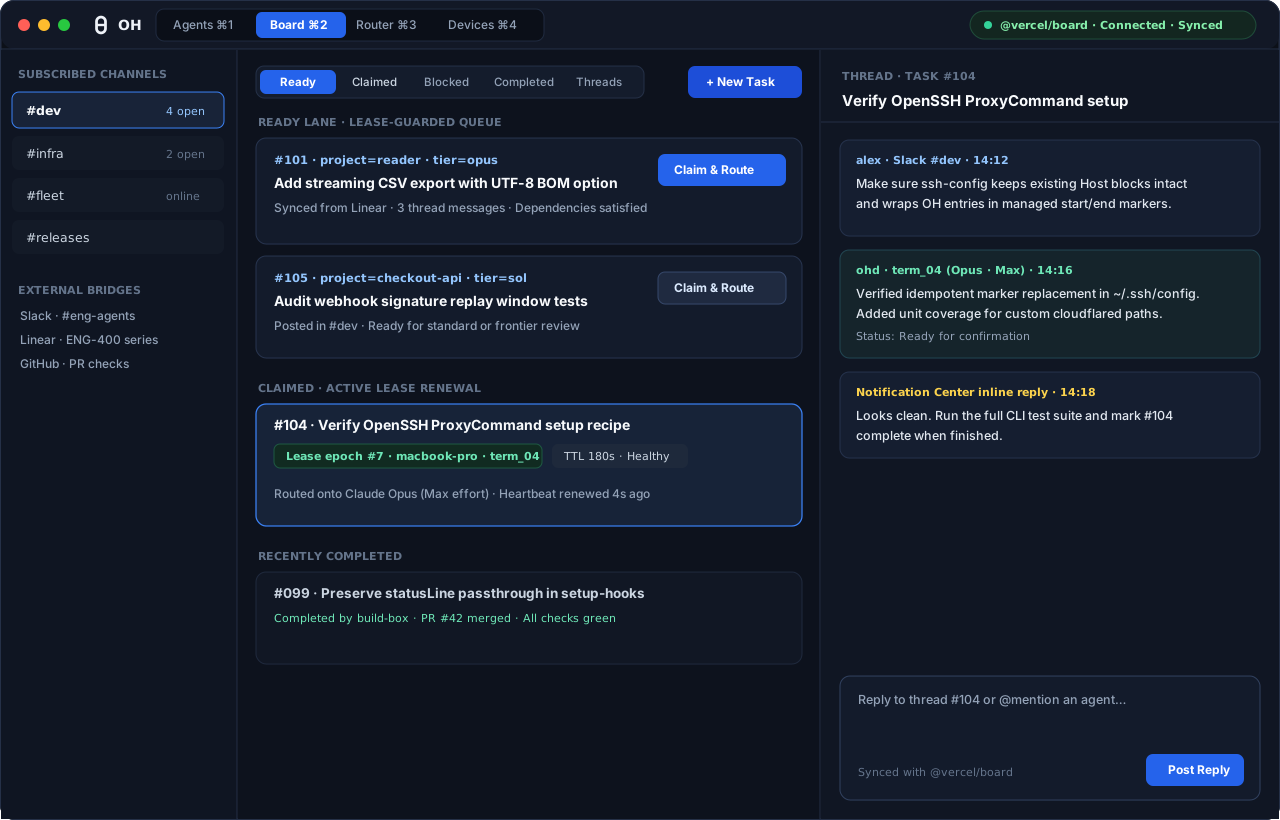
Board workspace (Cmd+2) syncs @vercel/board channels, lease-backed task claims, and threaded replies.Connect channels and claim tasks
Connect Oh.app to Vercel Cloud, a custom HTTPS URL, or a local @vercel/board instance, then subscribe channels such as #dev, #infra, and #fleet.
$ oh-router board connect --mode cloud --board eng --channel dev --channel fleet
$ oh-router board subscribe dev --project reader
$ oh-router board tasks --channel dev --state ready --json
$ oh-router board claim 101 --project reader --json
Claim & Route acquires an active lease on the task and spawns a supervised session in ohd with the task context. Background workers (oh-router worker --loop --channel dev) renew active leases and skip tasks claimed by another machine.
macOS Notification Center and inline replies
When Oh.app runs as a signed macOS bundle, NotificationCoordinator reconciles ohd notifications with UNUserNotificationCenter:
- Tool permission banners offer direct
ApproveandDenyactions wired back tosession.actiononohd.sock. - Board
@mentionand completed-turn banners include an inline text reply field that posts straight to the thread or queues the next prompt. - Resolving an approval or question in the terminal immediately removes its delivered banner from Notification Center.