Documentation · Start here
Use OH with coding agents
OH bundles the oh-router command and the oh agent skill inside Oh.app so Claude Code, Codex, and Cursor can inspect active sessions, steer prompts safely through the VT screen guard, and coordinate @vercel/board tasks.
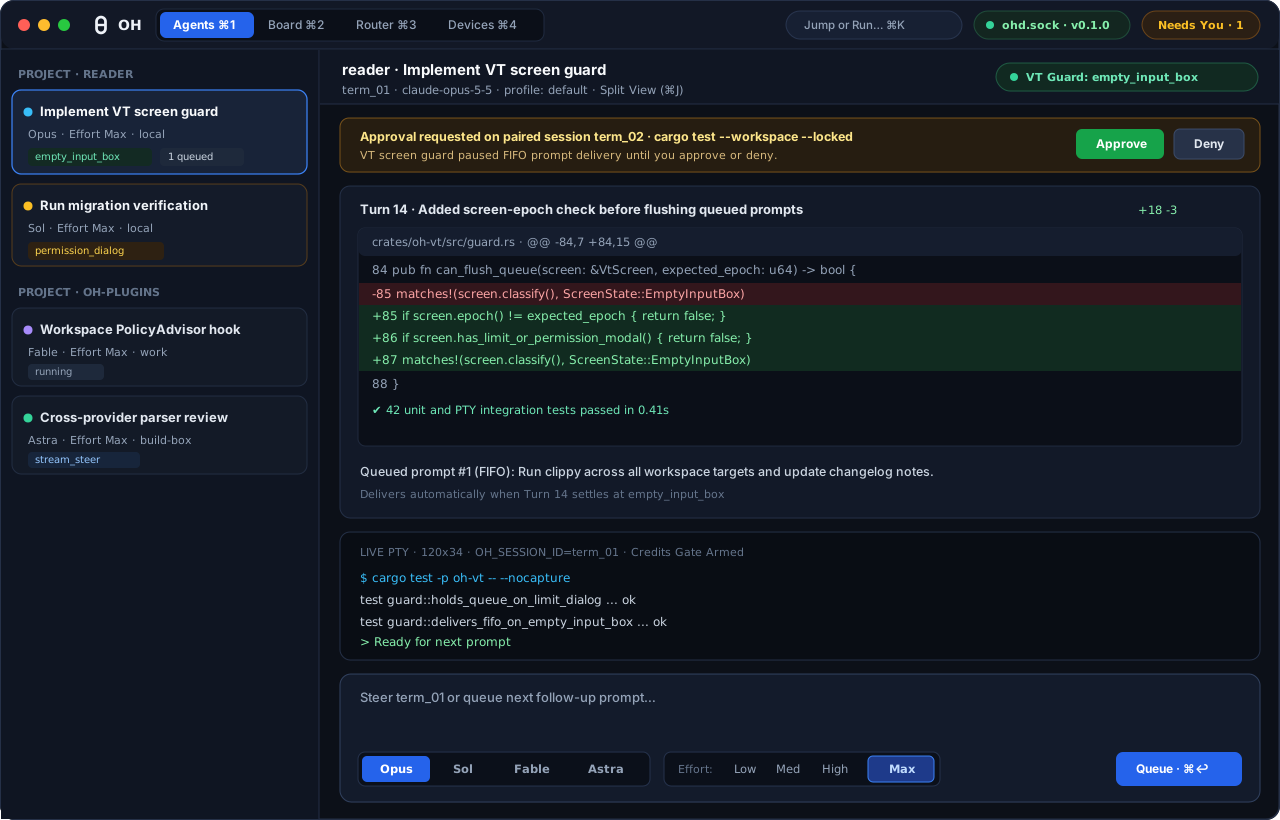
Agents workspace (Cmd+1) pairs structured diffs and a live PTY with the Opus / Sol / Fable / Astra picker and four-step effort control.1. Install OH and link oh-router
OH requires an Apple Silicon Mac (arm64) running macOS 15.0 or newer. Install Oh.app from oh.computer or Homebrew, then open **Help → Use with Coding Agents…** in the menu bar.
- Click **Install
oh-routerCommand (~/.local/bin/oh-router)** inside **Help → Use with Coding Agents…** to symlink~/.local/bin/oh-routertoOh.app/Contents/Helpers/oh-router. OH links onlyoh-routerand never overwrites any other command in~/.local/bin. - Click **Install Skill to
~/.agents/skills/oh/** (or runnpx skills add hraness/product-skills --skill oh) so local coding agents loadSKILL.md. - Optionally run
oh-router daemon setup-hooks --writeto register Claude Code lifecycle hooks while preserving any existingstatusLinecommand viastatusline-bridge --passthrough.
$ brew install --cask hraness/tap/oh
$ npx skills add hraness/product-skills --skill oh
$ oh-router --version
$ oh-router daemon setup-hooks --write
2. Inspect and steer through the 2D VT screen guard
Agents working alongside OH should always read structured JSON output (--json) before steering another session. ohd classifies every session's 2D virtual terminal screen into empty_input_box, busy_streaming, permission_dialog, trust_dialog, limit_dialog, or reset_ready_prompt.
$ oh-router ps --json
$ oh-router inspect term_01 --json
$ oh-router steer term_01 --mode queue "Run cargo test --workspace next"
Credits Protection Gate: whenever a session displays limit_dialog, ohd and Oh.app block raw PTY input and queued prompts so paid extra-usage prompts are never accepted accidentally.
3. Session environment variables
Every process spawned by ohd receives these environment variables automatically:
| Variable | Purpose |
|---|---|
OH_SESSION_ID | Unique session identifier (term_...) for the current PTY holder. |
OH_PROJECT | Project name passed to oh-router spawn --project. |
OH_PROFILE_ID | Workspace profile (default, work, etc.) selected for this session. |
OH_CONTROL_SOCKET | Private Unix domain socket (~/.local/state/oh/ohd/ohd.sock, mode 0600). |
OH_EVENT_SOCKET | Hook event socket (~/.local/state/oh/ohd/events.sock, mode 0600). |